


Sentry Pro for Tesla
4.468.00 Reviews
App Specs
- Version
- 1.5.71
- Updated On
- License
- Free
- Downloads
- 10,000+
- Developer
- Sentry Brain S.M.P.C.
- Categories
- Auto & Vehicles
- Platform
- Android
Screenshots
 Analysis by AppCompare
Have you ever wished you had a vigilant buddy keeping an eye on your Tesla when you aren't around? Well, let me introduce you to Sentry Pro—Tesla Notifications. This app is like having a virtual security guard for your car, providing real-time alerts and updates straight to your phone. I recently gave it a spin, and here’s my take on it.
Who benefits most from a second set of eyes?
I see the strongest case for this app when a Tesla spends long stretches parked away from home: at a workplace lot, a busy shopping area, or a public garage. It is also a useful fit for owners who already rely on Sentry Mode and want a phone-focused way to keep up with activity rather than repeatedly checking the car. The practical value is not that a notification prevents every problem; it is that it can help me notice an event sooner and decide whether it needs attention.
That distinction matters. A remote alert is not a substitute for being able to inspect the vehicle, and a clip cannot tell me everything about what happened around it. If I park in a secure private garage and rarely leave the car unattended in public, I may not get enough benefit to justify adding another service to my routine. For occasional trips, the car’s existing tools may be enough.
How it fits into an ordinary day
Picture a weekday when I leave the car in a crowded lot while I work. Rather than opening the Tesla app every so often, I can let Sentry Pro handle the notification side and check my phone if an alert arrives. If the notice concerns activity I want to understand, I can review the available camera clip and decide whether to take a closer look when I return. That is a more measured workflow than treating every alert as an emergency.
I would also think through the parking routine before turning on every possible alert. A car parked beside a busy walkway may encounter frequent activity that is harmless, while a quieter location may make a notification more meaningful. Tuning alerts around where the car actually stays can make the phone less distracting and preserve attention for events that deserve it.
Compared with the usual choices
The obvious alternative is to use the Tesla app and the car’s own Sentry Mode without an additional notification app. That is the simpler route if I only need occasional checks or prefer to keep the setup minimal. Sentry Pro is more appealing when I want its notification and action-oriented approach to be part of my regular parking routine; its purpose is narrower than a general vehicle-management app, so I would not choose it just to cover every ownership task.
Compared with a camera or alarm setup that requires me to notice an event later, a phone alert can make awareness more immediate. But it does not turn a phone into a live security monitor or guarantee that I can intervene. I would treat it as a layer of awareness, not as a replacement for sensible parking, the car’s built-in protections, or contacting appropriate help if there is a genuine incident.
Worth Reading Before You Choose

Baby Panda World Brings Quick Play to Modern Phones, but Its Game Library Feels Busy

ESPN’s Live Game View Makes Following Close Games Easier

QuizzLand Review: A Good Fit for Short Trivia Breaks, Not Every Player

Basketball Stars: Multiplayer Is Fast, but Can It Recover When Matches Go Wrong?

WEBTOON Turns Phone Updates Into a Better Reading Routine

Link to Windows Runs on Shared Habits, Not Social Feeds
Readability and navigation in daily use
First things first, setting up Sentry Pro—Tesla Notifications is a breeze. I downloaded it from the Play Store, and within minutes, I was good to go. The app syncs seamlessly with your Tesla account, and the interface is as user-friendly as it gets. A few taps here and there, and voilà, you're connected.
One thing that stood out was the intuitive design. Everything is neatly organized, and even if you’re not a tech wizard, you’ll find it straightforward. The app’s dashboard gives you a snapshot of all the essential details like battery status, charging updates, and of course, those all-important security alerts.
Real-Time Alerts
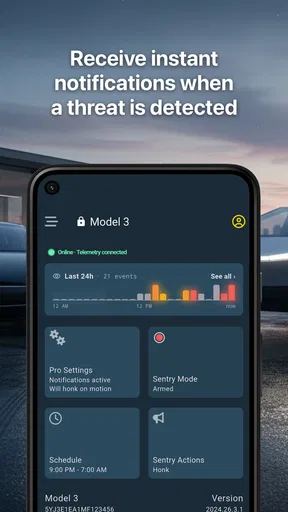
Now, onto the main event—those real-time notifications. Imagine this: you're sipping coffee at a café, and suddenly, you get a notification that someone is lurking around your car. That’s the magic of Sentry Pro. It sends instant alerts whenever there’s any suspicious activity near your Tesla.
The notifications are prompt and detailed. You get a brief description of the activity, and if you want more information, the app provides access to video clips from the car’s cameras. It’s like having eyes on your car 24/7. I found this feature particularly reassuring, especially when parking in unfamiliar areas.
Making alerts workable for different needs
Alert control is also a way to make the experience more comfortable. Someone who finds repeated sounds disruptive may prefer to rely on visual phone notifications, while another driver may want stronger prompts when they are not actively using the phone. I would test the notification behavior in a low-stakes setting first, then adjust it to suit my attention and sensory preferences instead of assuming the default is right for every situation.
There is a trade-off between sensitivity and calm. More alerts can make the car feel closely watched, but they can also interrupt a meeting, a conversation, or a commute. Quiet hours and location-based preferences, where available in the app’s settings, are worth considering as part of a routine rather than as an afterthought. I would review those choices whenever my parking pattern changes.
Customizable Settings
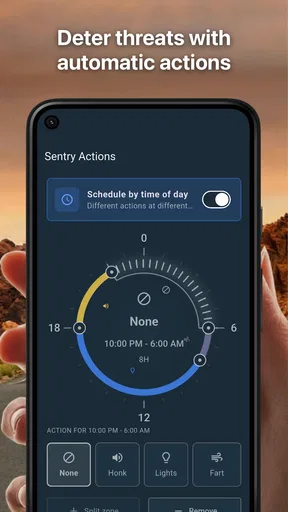
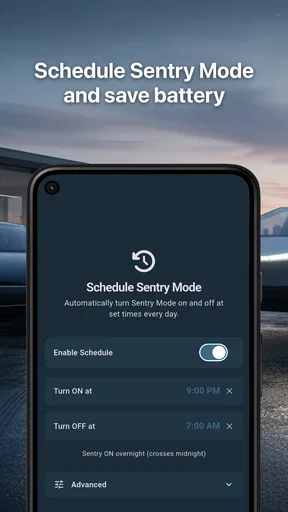
One of the things I appreciated was the level of customization. Not everyone wants to be bombarded with notifications, right? Sentry Pro lets you tweak the settings to your liking. You can choose which alerts to receive, set sensitivity levels, and even schedule quiet hours when you don’t want any interruptions. It’s all about tailoring the experience to fit your lifestyle.
Moreover, you can adjust the notification preferences for different locations. For instance, you might want more stringent security when your car is parked at the airport compared to when it’s at home. This flexibility is a huge plus in my book.
Situational access and realistic expectations
Phone alerts can be especially helpful when checking a screen is easier than making a call or walking out to the vehicle, but they still depend on having the phone nearby and being able to notice a prompt. In a noisy place, a sound alone may be easy to miss; during a quiet meeting, the same sound may be unwelcome. I would choose a notification style that works with the setting, then use the alert as a cue to check details when it is safe and convenient.
For drivers who share a car, it is sensible to agree on who is monitoring alerts and what counts as a reason to act. Otherwise, several people may receive the same notice and assume someone else is handling it. A simple shared routine—who checks a clip, who contacts the driver, and when to leave it alone—can make alerts more useful without turning every parking event into a group interruption.
Battery and Charging Features
Besides the security perks, Sentry Pro also offers handy updates on your car’s battery status. You can check the charge level, get notifications when charging is complete, and even monitor the charging rate. It’s a neat addition that ensures you’re always on top of your Tesla’s power needs.
What’s more, if you’re planning a long trip, the app can help you manage the charging schedule efficiently. You never have to worry about running out of juice, which is a big relief for any Tesla owner.
Trade-offs, cost, and who should skip it
The app is free to install, but in-app purchases range from $5.99 to $133.99 per item, so I would check what a paid option includes before committing. The free download is a low-friction way to explore whether its workflow suits me, while the wide spread in purchase prices makes it worth comparing the available choices with how often I actually park somewhere that calls for extra monitoring.
It is built for Tesla owners, not for drivers looking for a general-purpose car tracker, roadside assistance tool, or universal alarm. I would skip it if I do not own a Tesla, if I do not use the car’s security functions, or if phone alerts would add more stress than reassurance. It also may not suit someone who expects an alert to guarantee a response or wants every vehicle task managed in one place.
Remaining barriers and practical checks
Before relying on any alert system, I would check that notifications are allowed on the phone and that the app can reach me in the places where I expect to use it. Battery-saving settings, a muted phone, or poor connectivity can undermine the usefulness of a prompt, so I would not assume that “real-time” means I will always see an event at once. A sensible test is to confirm the setup while parked nearby and learn what the alert looks and sounds like before depending on it away from the car.
There is also a learning curve in deciding which notices are useful. If I receive too many low-priority prompts, I may start ignoring the phone; if I narrow the settings too far, I may miss something I care about. I would make one adjustment at a time and observe how it changes the day-to-day experience, rather than changing several preferences together and then guessing which one helped.
Created by Sentry Brain S.M.P.C., this Auto & Vehicles app is free to download and rated for Everyone. It has a 4.3 average from 276 ratings, with 51 written reviews and more than 10K installs. Its current version is 1.5.59, and it was released on August 24, 2023; devices need Android 7.0 or later. Those details place it as an established, focused companion rather than a brand-new general driving utility, though owner feedback and personal fit matter more to me than popularity alone.
Getting Started with Sentry Pro
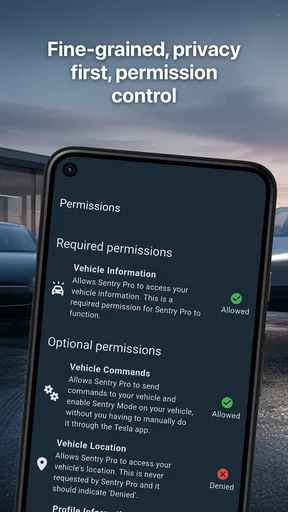
One thing I would treat carefully during setup is account access. Since the app connects with a Tesla account, I would read the sign-in and permission screens rather than tapping through automatically, and use only the access needed for the features I intend to try. I would also make sure I understand how to disconnect the app if I stop using it. That is a useful habit for any connected-car companion, especially one that can surface vehicle information on a phone.
Motor and sensory considerations
For someone managing fatigue, limited mobility, or a busy schedule, getting a phone notification can reduce the need to walk back to a parked car just to check whether something happened. That convenience has limits: reviewing a clip still takes attention and a usable screen, and deciding what to do may require follow-up outside the app. I would use it to reduce unnecessary trips, not as a promise that I can resolve every issue remotely.
Likewise, the charging updates may help a driver who prefers to plan around a clear status rather than repeatedly checking the vehicle. They are most useful as prompts within a routine—for example, checking charge completion before leaving for an appointment—not as a replacement for confirming that a trip plan makes sense. The app can support a more considered routine, but it cannot remove the need to make that judgment.
Inclusive verdict
Overall, I find the idea valuable when a Tesla owner wants a more attentive phone-based view of security activity and charging, while still keeping realistic expectations about alerts. The app’s settings can help people shape interruptions around their routine, and its focused purpose is easier to understand than a sprawling vehicle dashboard. At the same time, setup, phone access, notification habits, and comfort with account-linked tools will affect how usable it feels from person to person.
The app has a 4.3 average, is free to download, and is aimed at Everyone, but those broad signals do not settle whether it is right for a particular driver. I would try it if I routinely leave my Tesla in places where timely awareness matters, then keep only the alerts that genuinely help. If I mainly want occasional battery checks, already feel well served by Tesla’s own tools, or find extra phone prompts distracting, I would stay with the simpler setup. For the right owner, it can add a useful layer of attention without pretending to replace careful parking or common sense.
Why You Need Sentry Pro
So, why should you consider downloading Sentry Pro—Tesla Notifications? In a nutshell, it’s about peace of mind. Knowing that your car is being monitored and that you’ll be alerted to any potential threats is invaluable. Plus, the additional features like battery monitoring make it a comprehensive toolkit for Tesla owners.
It’s not just about security; it’s about convenience. You have all the vital stats and alerts in one place, accessible with just a tap. And with the continuous updates and improvements, the app keeps getting better.
To sum it up, if you own a Tesla, Sentry Pro—Tesla Notifications is a must-have. It’s like having a personal assistant dedicated to your car’s well-being. So, go ahead, give it a try, and experience the peace of mind that comes with knowing your Tesla is in safe hands.
Pros
- Real-time Tesla alerts enhance safety.
- Customizable notifications for user preferences.
- Easy integration with Tesla account.
- User-friendly interface for quick navigation.
- Low battery usage preserves phone life.
Cons
- Limited to Tesla vehicle owners.
- Requires stable internet for real-time alerts.
- No offline support for notifications.
- Subscription fee for premium features.
- In-app ads can be distracting.
FAQs for Sentry Pro for Tesla
What is Sentry Pro—Tesla Notifications and how does it work?
Sentry Pro—Tesla Notifications is an app designed to enhance your Tesla vehicle's security and monitoring features. It works by sending real-time alerts directly to your smartphone whenever your car's Sentry Mode detects suspicious activity. This ensures you stay informed and can take immediate action if needed.
Is Sentry Pro—Tesla Notifications compatible with all Tesla models?
Sentry Pro—Tesla Notifications is compatible with most Tesla models that support Sentry Mode, including the Model S, Model X, Model 3, and Model Y. However, it's always a good idea to check the app's compatibility notes in the app store to ensure it works with your specific vehicle model and software version.
What are the main features of Sentry Pro—Tesla Notifications?
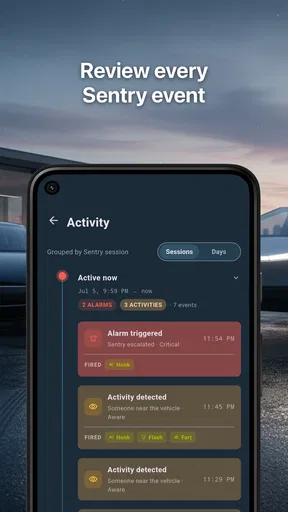
The app offers several key features, including customizable alert settings, real-time notifications for detected events, and a detailed event log. Users can also view captured footage from Sentry Mode and adjust notification preferences to prioritize certain types of alerts, ensuring the app meets their specific needs.
Are there any subscription fees or in-app purchases required?
Sentry Pro—Tesla Notifications may offer both free and premium versions. While the basic features might be available for no charge, a subscription may be required for advanced functionalities such as extended video storage or enhanced alert customizations. Be sure to review the app’s pricing details in the app store.
How secure is my data with Sentry Pro—Tesla Notifications?
The app prioritizes user privacy and data security. It employs encryption to protect your information and ensures that all data is stored securely. However, users should review the privacy policy and terms of service to understand how their data is handled and any measures they can take to further safeguard their information.


